Phishing and Email Scams: How to Spot Them and What to Do
Most cyber attacks on small UK businesses don’t start with clever hacking. They start with a message. In the government’s Cyber Security Breaches Survey 2025/2026, 43% of UK businesses reported a breach or attack in the previous 12 months, and phishing was by far the most common type, affecting 38% of all businesses. An email, a text or a call persuades someone to click, sign in, open a file or pay, and that’s all the criminal needs.
This guide brings together what we tell the companies we look after: the scams that turn up most often in UK inboxes, the few checks that catch nearly all of them, what to do in the first hour if someone has already clicked, and the settings that make the next attempt far less likely to work.
What phishing looks like now
Phishing is any message that pretends to come from someone you trust so that you’ll do something you otherwise wouldn’t: click a link, open an attachment, type in a password, approve a payment or send information. Email is still the most common route, but the same trick arrives by text (smishing), phone call (vishing), QR code, social media and messaging apps.
Three things have changed in the last few years.
The spelling mistakes have gone. Generative AI lets criminals write fluent, well-formatted messages in any language and tailor them to a company using what’s on its website and LinkedIn. The NCSC expects AI to make it harder for anyone, however experienced, to tell whether an email or a password reset request is genuine. “Look out for poor grammar” is no longer reliable advice on its own.
Messages arrive inside real conversations. In a reply-chain attack, a criminal who has got into one mailbox replies to a genuine email thread, so the message appears under a subject line you recognise, from someone you’ve been dealing with. The only clue may be a request that doesn’t quite fit: a link to “updated documents” or new bank details.
The bait is wherever people look. Criminals buy search adverts that sit above the real result for software downloads and login pages (malvertising), set up fake profiles on LinkedIn that open with a friendly message and follow up with a link, and stick QR codes over genuine ones on posters and parking meters. Our posts on social media phishing and QR code scams cover those two in more detail.
From our work
When we first take on a client, we usually see a burst of phishing attempts. The numbers drop once their staff have been through our cyber security training, but no amount of training stops every click.
David Gilbey, Just Gilbey IT Solutions
That’s why the checks below matter, and why the protections at the end of this guide matter even more.
How to spot a phishing email
No single sign proves a message is fake, and a good one may show none of them. Teach everyone to stop and run through five checks before acting on anything unexpected.
- Who really sent it? Look at the full email address, not just the display name. Watch for lookalike domains (justgi1bey.co.uk), free email accounts claiming to be a company, and replies that go to a different address. A message from a real address can still be fake if that account has been taken over.
- Where does the link go? On a computer, hover over the link and read the address that appears. On a phone, press and hold. Be wary of shortened links, addresses that only contain the company’s name somewhere in the middle, and any sign-in page you reached from a link rather than by typing the address or using a bookmark.
- Were you expecting the attachment? Unexpected invoices, “scanned documents”, voicemail files and shared files are common lures. HTML attachments that open a sign-in page, and PDFs or documents that ask you to click through to “view” them, are particular warning signs.
- What is it asking you to do? Pressure is the giveaway: act now, keep it confidential, your account will be closed, a payment will fail. So is any request to sign in, pay, change bank details, buy vouchers or turn off a security check.
- Does it fit? Would this person normally ask this, in this way, at this time? If not, check through a channel you already have: phone the number on your records (not the one in the message), or message them on Teams.
A phishing email can look perfect. Checks 4 and 5 are the ones that catch the best fakes, because the criminal can copy a logo but not change what your supplier or colleague would ask.
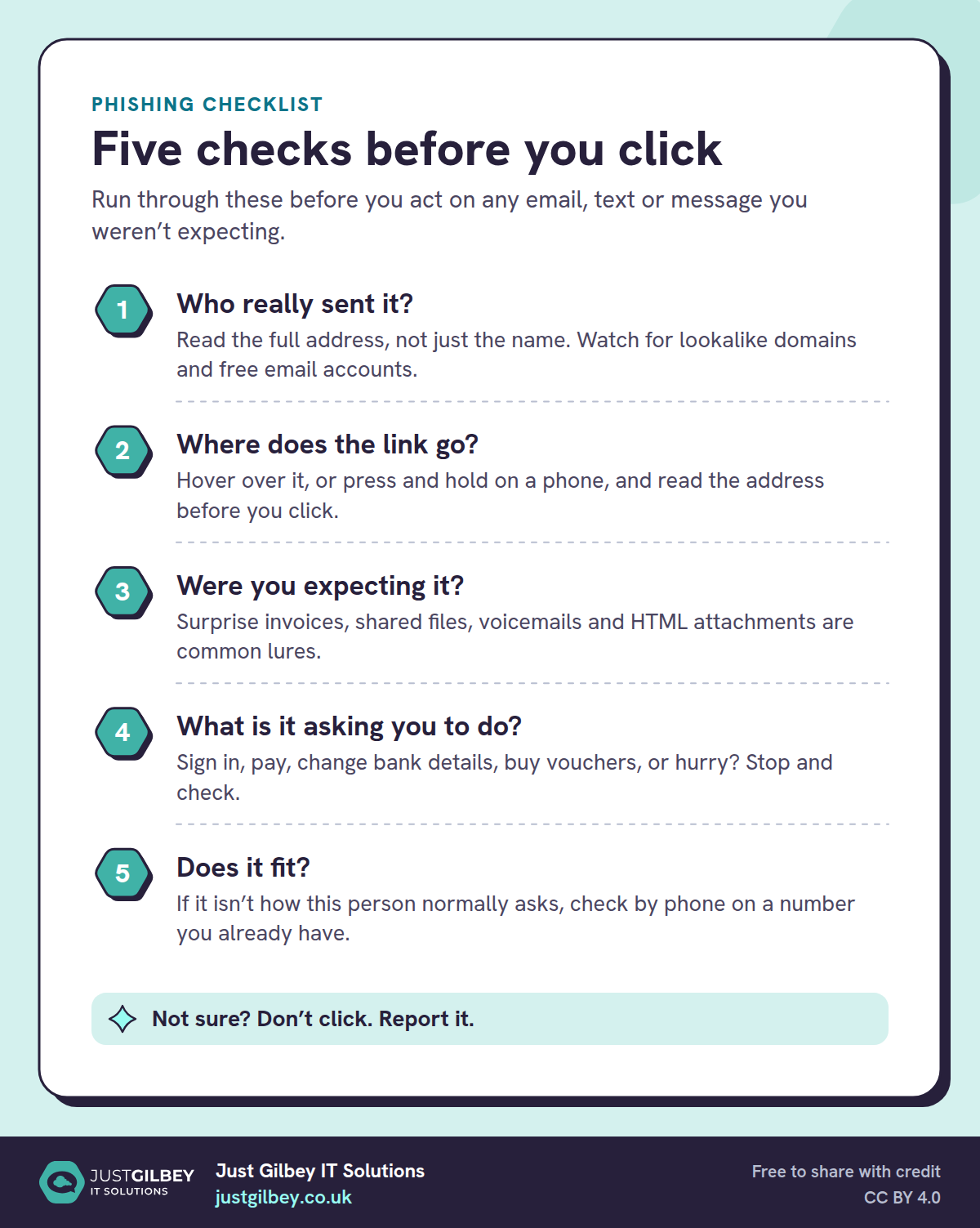
Five checks before you click
Run through these before you act on any email, text or message you weren’t expecting.
- Who really sent it? Read the full address, not just the name. Watch for lookalike domains and free email accounts.
- Where does the link go? Hover over it, or press and hold on a phone, and read the address before you click.
- Were you expecting it? Surprise invoices, shared files, voicemails and HTML attachments are common lures.
- What is it asking you to do? Sign in, pay, change bank details, buy vouchers, or hurry? Stop and check.
- Does it fit? If it isn’t how this person normally asks, check by phone on a number you already have.
Not sure? Don’t click. Report it.
The scams UK businesses see most
HMRC
Fake HMRC messages promise a tax refund, warn of a penalty or ask you to “verify” your details, usually with a link to a convincing copy of a GOV.UK page. They spike around the self assessment deadline in January and whenever a new government payment is in the news. HMRC says it never tells you about a tax rebate, or asks for personal or payment details, by text message, and it only emails about rebates or payment information from addresses ending hmrc.gov.uk.
Accountants get a particular version: messages that appear to come from HMRC or a client, asking you to log in to an agent account or open “correspondence”.
Royal Mail and parcel deliveries
A text or email says a parcel couldn’t be delivered and asks for a small “redelivery fee”. The fee is a pretext: the real aim is your card details, which are then used for larger payments or for a follow-up call pretending to be your bank’s fraud team. Royal Mail says it only asks for payment by text or email when a customs fee is due, and then it also leaves a grey “Fee to Pay” card. For underpaid postage it leaves the card and doesn’t ask by text or email at all. The same scam is sent in the name of Evri, DPD and other couriers.
Microsoft 365 sign-in pages
The most damaging scam for most businesses is a link to a fake Microsoft 365 sign-in page, often sent as a “shared document”, a voicemail notification or a DocuSign-style request. Many current kits sit between you and the real Microsoft page and copy the session as you sign in, so a code from a text or an authenticator app doesn’t always stop them. Microsoft calls this token theft: the attacker replays the signed-in session, even though the user completed multi-factor authentication. Once a criminal has your mailbox, they can read months of email, hide replies with mailbox rules and send messages to your clients from a real address. Our post on fake Microsoft 365 sign-in pages explains how to spot one and the settings that stop them working.
Changed bank details and fake invoices
Payment diversion (also called invoice or mandate fraud) is where a criminal persuades you, or your client, to pay into their account instead of the right one. It usually follows a mailbox compromise or a lookalike email address: an invoice arrives from a real supplier’s address, or from one a single letter different, with a note that the bank details have changed. UK Finance’s Annual Fraud Report 2026 (page 41) recorded £41.3 million lost to invoice and mandate fraud in 2025, more than two-thirds of it from business accounts. Our post on business email compromise goes into how these attacks are put together.
For solicitors, the target is the completion money. Criminals watch a compromised mailbox and, at the moment funds are due, send the buyer an email “from the solicitor” with new account details. The Law Society’s advice, written with the SRA and the National Crime Agency, is to check by calling before transferring money, on the solicitor’s published number rather than one given in an email. The defence is a rule that nobody changes bank details on the strength of an email, and that clients are told at the start of a matter that you will never do so. Our page on IT support for solicitors covers the controls we put in place.
Messages from “the boss”
A text or WhatsApp message from a senior person who is “in a meeting” asks someone to buy gift cards, make an urgent payment or send a document. The name and photo are easy to copy; the number isn’t theirs. Voice cloning means a phone call that sounds like them isn’t proof either. If you’ve had a text that seems to come from your own number, our post on smishing explains what’s going on.
If someone has already clicked
People click. It happens in well-run companies with trained staff, and the worst response is for someone to keep quiet because they’re embarrassed. Make it clear that reporting quickly is what you want, and that nobody gets into trouble for it. Then follow these steps.
If they typed in a password:
- Change that password straight away, from a different device, and anywhere else the same password is used.
- Sign the account out of every session (in Microsoft 365, an administrator can revoke sessions), because a stolen session can outlive a password change.
- Check multi-factor authentication: remove any phone or app that isn’t theirs, and make sure it’s switched on.
- Look for mailbox rules that forward, move or delete messages, and for emails sent that the person didn’t write.
If they opened a file or installed something: disconnect the device from the network (unplug it or turn off Wi-Fi), but don’t switch it off or wipe it, and call whoever looks after your IT so it can be checked.
If money was sent or card details were given: call your bank immediately using the number on the back of your card or on its website. The sooner the bank knows, the better the chance of stopping or recovering the payment. If your business counts as a micro-enterprise, the mandatory reimbursement rules for authorised push payment fraud may cover you, up to £85,000, if you report it within 13 months; your bank can tell you whether you qualify. Larger businesses aren’t covered, which is why prevention matters so much. (The Payment Systems Regulator is being merged into the FCA, and the rules are moving with it.)
In every case: tell whoever runs your IT, warn colleagues if the message went to others, and keep the email (forward it as an attachment, or take a screenshot) rather than deleting it. The NCSC also suggests running a full antivirus scan on the device that was used.
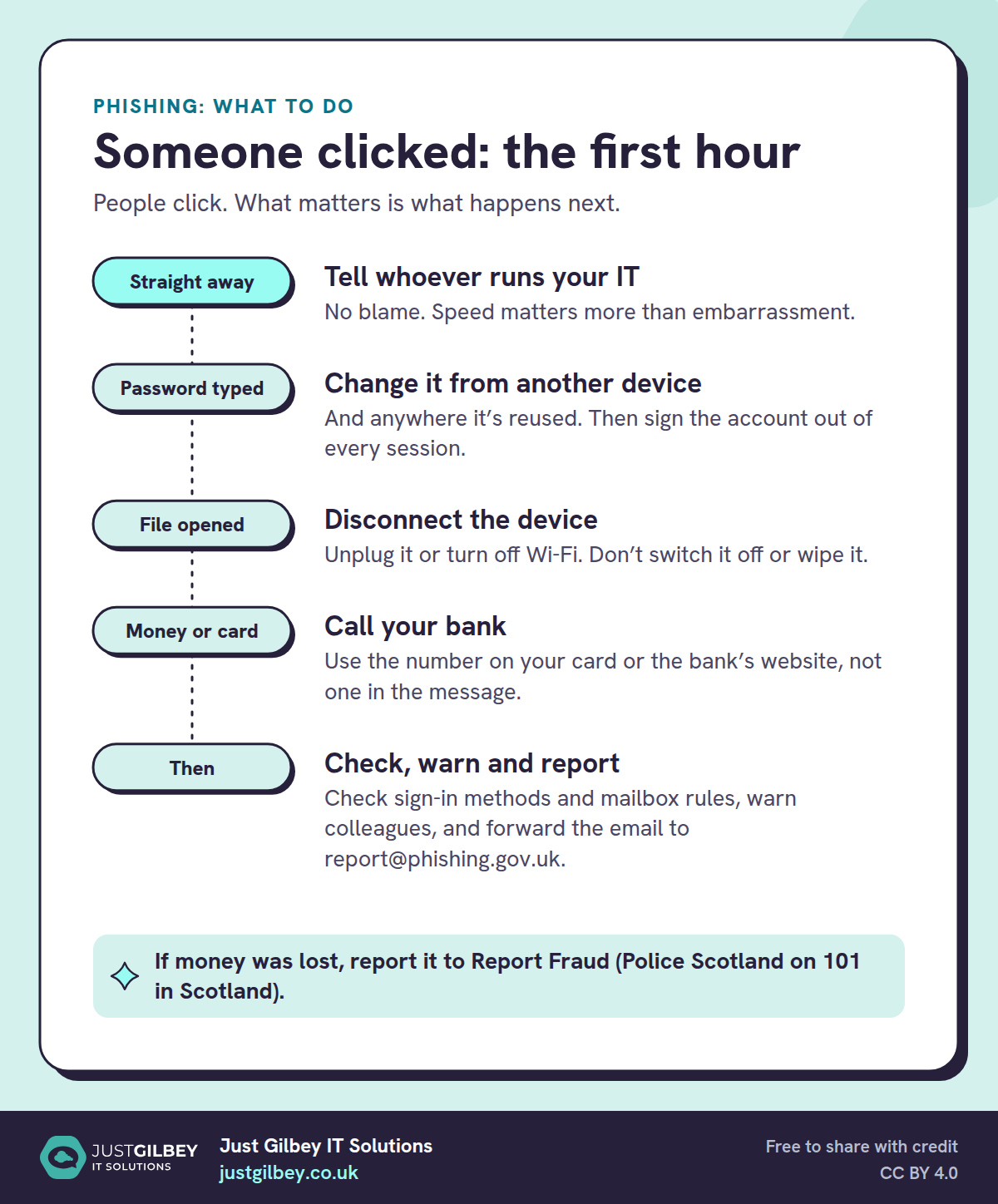
Someone clicked: the first hour
People click. What matters is what happens next.
- Straight away: Tell whoever runs your IT. No blame. Speed matters more than embarrassment.
- Password typed: Change it from another device. And anywhere it’s reused. Then sign the account out of every session.
- File opened: Disconnect the device. Unplug it or turn off Wi-Fi. Don’t switch it off or wipe it.
- Money or card: Call your bank. Use the number on your card or the bank’s website, not one in the message.
- Then: Check, warn and report. Check sign-in methods and mailbox rules, warn colleagues, and forward the email to report@phishing.gov.uk.
If money was lost, report it to Report Fraud (Police Scotland on 101 in Scotland).
If personal data may have been exposed, for example because a mailbox containing client information was accessed, you may need to report it to the ICO, which has formally been the Information Commission since 30 September 2026. Under UK GDPR, if a breach is likely to put people at risk, you must tell the ICO as soon as possible, and where feasible within 72 hours of becoming aware of it. The ICO’s advice is to report early and update later. Our post on what to do when you’re told your data was breached covers the steps from the other side.
Where to report phishing
Reporting takes a minute and helps get the scam taken down for everyone.
- Suspicious emails: forward them to report@phishing.gov.uk, the NCSC’s Suspicious Email Reporting Service. The NCSC says reports to the service have led to more than 450,000 scam web addresses being taken down.
- Scam texts: forward them to 7726 (free on UK networks).
- Fake HMRC messages: forward emails to phishing@hmrc.gov.uk and texts to 60599.
- Fake Royal Mail messages: forward them to reportascam@royalmail.com.
- If money has been lost: call your bank first, then report it to Report Fraud (reportfraud.police.uk or 0300 123 2040), which replaced Action Fraud in England, Wales and Northern Ireland in December 2025. In Scotland, call Police Scotland on 101.
Inside your company, use the Report button in Outlook, which sends the message to Microsoft and, if it’s set up, to your administrator or IT provider. Messages reported as phishing are removed from the inbox. Microsoft is retiring the older Report Message and Report Phishing add-ins in favour of this built-in button, so if your staff still use an add-in, it’s worth switching.
Making phishing harder to work
Training helps, but a business shouldn’t depend on every person getting every message right. The NCSC recommends several layers, so that what one misses the next catches. Its guidance for organisations sets out four: make it hard for attackers to reach your users, help users spot and report phishing, protect against the phishing that gets through, and respond quickly. For a small business, that means:
- Make your own domain harder to fake. SPF, DKIM and DMARC tell other mail servers which senders are genuinely you, so criminals can’t easily send email that appears to come from your address. Our free email security check shows how your domain is set up today.
- Filter what arrives. Microsoft 365 includes basic filtering. Microsoft Defender for Office 365, included in Microsoft 365 Business Premium, adds checks on links when they’re clicked and opens attachments in a safe place first. Whatever you use, make sure it is switched on and set up, not just licensed.
- Make stolen passwords less useful. Multi-factor authentication on every account stops most attacks that rely on a password alone. Phishing-resistant methods, such as passkeys or Windows Hello for Business, also defeat the fake sign-in pages that copy a session, and Conditional Access can block sign-ins from devices you don’t manage. The NCSC now recommends passkeys wherever a service supports them, and Microsoft recommends phishing-resistant sign-in and Conditional Access against token theft.
- Watch for the signs of a takeover. New forwarding rules, sign-ins from unusual places and a sudden burst of sent email are all things monitoring can flag, often before anyone notices anything wrong.
- Agree a payment rule. Nobody changes supplier or client bank details, or makes an unusual payment, on the strength of an email alone. Confirm by phone on a number you already hold, and have a second person approve.
- Train with real examples. Short, regular training and simulated phishing emails work better than an annual presentation. Celebrate reports, including false alarms.
- Stop bad apps getting access. Turn off the setting that lets staff grant third-party apps access to their Microsoft 365 data, so a convincing “add-in” can’t quietly read their mailbox. Our checklist for vetting third-party apps explains why.
Most of these are settings rather than products. The difference between a company that shrugs off a phishing email and one that loses a mailbox is usually whether those settings were switched on and checked, and whether anyone is watching.
Questions people ask
What should I do if I clicked a link in a phishing email?
If you typed in a password, change it straight away from a different device, and anywhere else you use it, then ask your IT provider to sign you out of every session and check for new mailbox rules. If you opened a file, disconnect the device from the network but don’t switch it off. Either way, tell whoever looks after your IT quickly. Nobody should get into trouble for reporting it.
Where do I report a phishing email in the UK?
Forward suspicious emails to report@phishing.gov.uk and scam texts to 7726. If money has been lost, call your bank first, then report it to Report Fraud (England, Wales and Northern Ireland) or Police Scotland on 101. At work, also use the Report button in Outlook so your IT provider sees it.
Does HMRC email or text about tax refunds?
HMRC says it never tells you about a tax rebate, or asks for personal or payment details, by text message. It only emails about rebates or payment information from addresses ending hmrc.gov.uk. Forward suspicious HMRC emails to phishing@hmrc.gov.uk and texts to 60599.
Does multi-factor authentication stop phishing?
It stops most attacks that only steal a password, so it should be on every account. But many fake sign-in pages now copy the whole signed-in session, which gets past codes sent by text or shown in an app. Phishing-resistant methods such as passkeys, together with Conditional Access, close that gap.
Will the bank refund money lost to invoice fraud?
It depends on the size of your business. Individuals, charities and micro-enterprises are covered by the mandatory reimbursement rules for authorised push payment fraud, up to £85,000. Larger businesses aren’t, so a rule that bank details are always confirmed by phone is the real protection.
Sources
- GOV.UK: Cyber security breaches survey 2025/2026 (30 April 2026)
- NCSC: Phishing attacks: defending your organisation
- NCSC: What to do if you’ve clicked on a phishing link or replied to a scam
- NCSC: The near-term impact of AI on the cyber threat (24 January 2024)
- NCSC: Leave passwords in the past, passkeys are the future (23 April 2026)
- NCSC: Report suspicious emails
- GOV.UK: Report suspicious emails, websites and text messages
- GOV.UK: Report Fraud, new service from City of London Police (4 December 2025)
- HMRC: Report suspicious HMRC emails, text messages and phone calls (updated 24 November 2025)
- Royal Mail: Help with online security
- Microsoft Learn: Use the built-in Report button in Outlook (3 July 2026)
- Microsoft Learn: Token theft playbook
- Microsoft Learn: Protecting tokens in Microsoft Entra ID
- Microsoft UK: Compare all Microsoft 365 business plans
- UK Finance: Annual Fraud Report 2026 (15 June 2026, PDF)
- The Law Society: Payment diversion fraud
- Payment Systems Regulator: APP fraud reimbursement protections
- ICO: Personal data breaches