Using AI Safely at Work: A UK Guide to Copilot and ChatGPT
About a third of UK businesses with 10 or more staff now use AI: the ONS found it rose from about 12% in late 2023 to about 35% by June 2026. That figure may not include the member of staff quietly pasting an email into a free chatbot to tidy it up.
That’s why the NCSC has started writing about “shadow AI”: tools people use for work that the company doesn’t know about.
This guide covers what a small UK business needs to get right: where your data goes in the common tools, what’s safe to put into them, the rules your staff need, and what regulators and professional bodies expect. It describes the tools as they are in October 2026; they change quickly, so check the providers’ own pages before you decide.
Four risks
Using AI at work raises four practical risks.
Your data leaves your control. Whatever you type into an AI tool is sent to the provider. Depending on the tool and the plan, it may be stored, used to improve the provider’s models, or read by people reviewing conversations. For client information, that can be a breach of confidentiality, and of UK GDPR if it’s personal data.
The answers can be wrong. AI tools write fluently and confidently, including when they’re making things up. The SRA’s warning notice in August 2026 named these “hallucinations” as one of its two main concerns, after made-up case citations turned up in court.
The tools can be tricked. “Prompt injection” is where hidden instructions in a document, email or web page make an AI tool do something it shouldn’t. The NCSC says these tools can’t reliably tell instructions from data, so the risk may never be fully removed. Be careful with AI tools that can read your email or act on your behalf.
Criminals use AI too. Phishing emails are less likely to have tell-tale spelling mistakes, and voices and faces can be faked. In 2024 an employee at the engineering company Arup in Hong Kong paid out about US$25 million after a video call with deepfakes of the company’s finance director and colleagues. Call-back checks are the defence; see business email compromise and payment diversion.
Free tools, business tools and Copilot: where your data goes
The same name can mean very different things depending on the plan and how you sign in.
ChatGPT. On personal plans (Free, Plus, Pro and Go), OpenAI may use your conversations to train its models unless you turn off “Improve the model for everyone” in Settings, under Data controls. Temporary Chats aren’t used for training, but may be kept for up to 30 days. ChatGPT Business (formerly Team) and Enterprise don’t train on your data by default.
Google Gemini. In the consumer Gemini app, Google says a subset of chats are reviewed by human reviewers, and warns people not to enter anything confidential they wouldn’t want a reviewer to see. Gemini in a Google Workspace business account isn’t human reviewed or used for training outside your organisation without permission.
Microsoft Copilot Chat. Included with Microsoft 365 business plans. When people sign in with their work account, it has enterprise data protection: prompts and responses aren’t used to train Microsoft’s models. It answers from the web and anything you give it, but it can’t search your company’s files. For a Microsoft 365 company, it’s the obvious tool to make the default.
Microsoft Copilot (the paid version). Microsoft is moving to this name, while licences and some screens still say Microsoft 365 Copilot. It works with your email, files, chats and meetings, and Microsoft says it only shows people data they already have permission to view. So if your files are overshared, paid Copilot makes them much easier to find.
What’s safe to put into AI tools
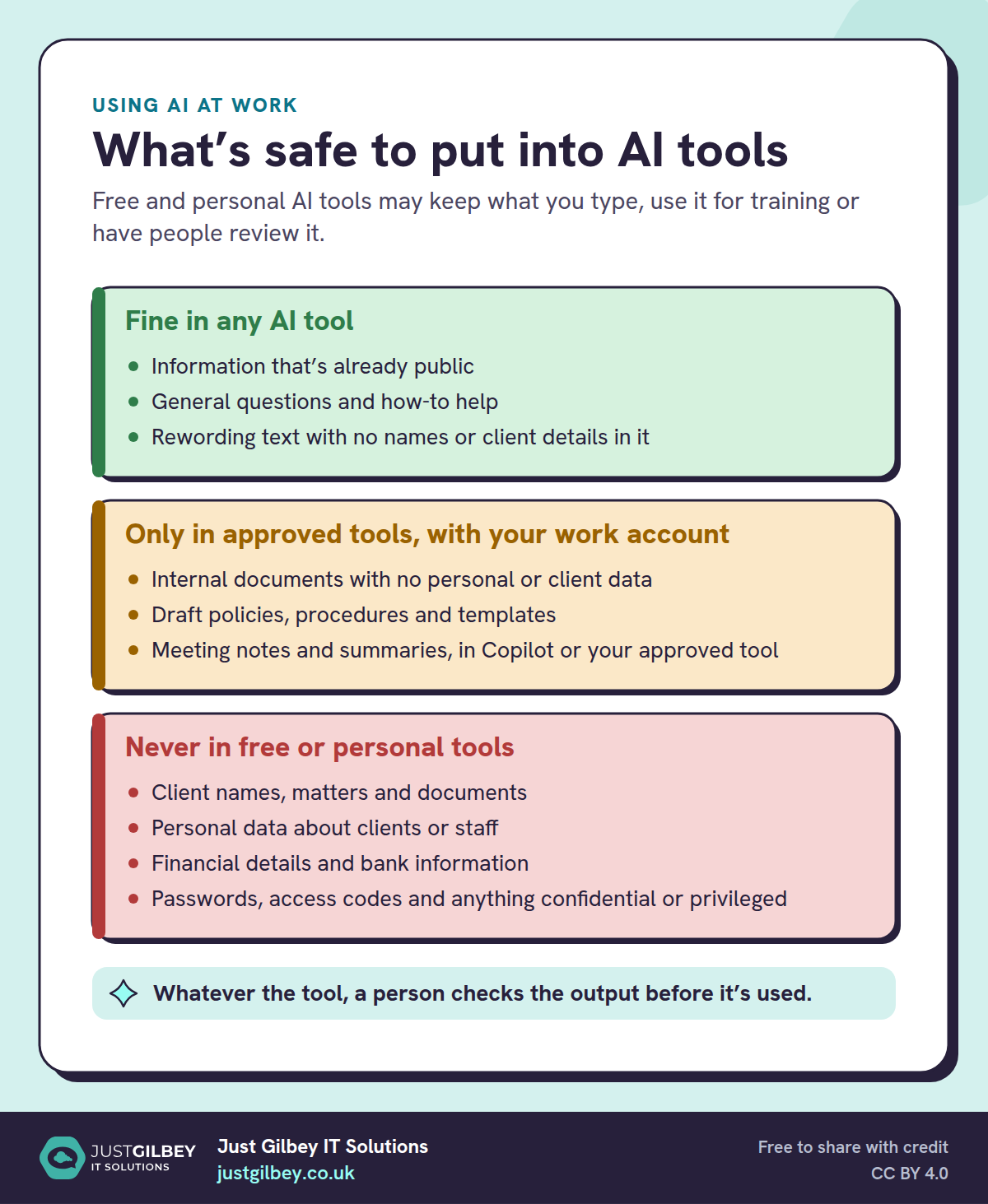
What’s safe to put into AI tools
Free and personal AI tools may keep what you type, use it for training or have people review it.
Fine in any AI tool
- Information that’s already public
- General questions and how-to help
- Rewording text with no names or client details in it
Only in approved tools, with your work account
- Internal documents with no personal or client data
- Draft policies, procedures and templates
- Meeting notes and summaries, in Copilot or your approved tool
Never in free or personal tools
- Client names, matters and documents
- Personal data about clients or staff
- Financial details and bank information
- Passwords, access codes and anything confidential or privileged
Whatever the tool, a person checks the output before it’s used.
Microsoft Copilot: permissions first
Paid Copilot is good at drafting, summarising meetings and finding things across your files. Because it can reach everything a person can open, check who can see what in SharePoint, OneDrive and Teams before you buy licences: old “anyone with the link” shares, groups that include everyone, and sites nobody has looked at in years.
From our work
Before rolling out Copilot for one client, we talked their team through the risk of skipping the basics. Copilot can find anything a person is allowed to open, so if file permissions are loose, someone could ask it for everyone’s salaries, or turn up information they’d never have found on their own. We started with a few users and put an AI policy and training in place alongside it. The team now uses Copilot to help write case studies and some of their standard operating procedures.
David Gilbey, Just Gilbey IT Solutions
Start small: paid Copilot for the handful of people who write, summarise and search the most, then decide based on how much they use it. Our guide to Microsoft 365 for small businesses explains the plans, and our post on what Copilot does in 2026 covers the features.
Find out what people already use
Before writing rules, find out what’s happening. Ask your team which AI tools they use and what for; you’ll learn where AI is saving time as well as where the risks are. The NCSC’s advice on shadow AI is to talk openly with staff and give them secure alternatives, rather than ban tools without offering anything in their place.
From our work
One client found that staff were using ChatGPT and other AI tools without anyone knowing. We put a filter in place that showed which tools each person was using, which gave the client the full picture. We then blocked those tools and trained the staff.
David Gilbey, Just Gilbey IT Solutions
Rules for your staff
An AI policy doesn’t need to be long. It needs to answer four questions:
- Which tools are approved, and for what? For example: Copilot Chat with your work account for drafting and summarising; nothing else for client work without approval.
- What stays out? Client names and matters, personal data, financial details, passwords, and anything confidential or legally privileged, unless your company has approved a tool for it.
- When does a person check the output? Always, before it goes to a client, is published, or is relied on for a decision.
- Who to ask, and how to report a mistake. If someone pastes something they shouldn’t have, they should say so straight away, without fear of blame.
Our posts on everyday AI rules for your staff and writing an AI policy go further, and our post on using AI without weakening your cyber security covers AI apps and browser extensions that ask for access to your email and files.
Check what comes out
Whatever tool you use, a person is responsible for what goes out. For solicitors, the SRA’s updated supervision guidance says AI output needs “appropriate human review, scrutiny and professional judgement”, and that an authorised individual keeps ultimate responsibility. ICAEW’s advice to accountants is to keep client and confidential data off public AI tools and to be open about when AI has been used.
That’s good practice for everyone: check facts, figures and references against the source, read anything AI drafted as if a junior had written it, and don’t let it make decisions about people on its own.
AI and data protection
If you use AI with personal data, UK GDPR applies in full. The ICO (formally the Information Commission since 30 September 2026) says in its guidance that in the vast majority of cases, using AI with personal data is likely to be high risk, which means you need a data protection impact assessment first. That guidance is under review after the Data (Use and Access) Act, so check the latest version.
The Act also changed the rules on automated decisions. Since 5 February 2026, decisions with a significant effect on people can be made by automated means on most lawful bases, but only with safeguards: telling people, letting them make representations, a way to get human intervention, and a way to challenge the decision. This isn’t legal advice; our guide to UK GDPR for small businesses covers the rest of the law.
Getting started
- Ask your team which AI tools they use now, and what for.
- Make Microsoft Copilot Chat (or your business equivalent) the approved default, signed in with work accounts.
- Write a one-page AI policy covering the four questions above.
- Check SharePoint and OneDrive permissions before buying Microsoft Copilot licences.
- Trial paid Copilot with a few people, then decide.
- Review the rules every year, and whenever you approve a new tool.
Our post on 10 AI tools worth using in a UK office has ideas for where AI saves time once the basics are in place.
Questions people ask
Is it safe to use ChatGPT at work?
It depends on the version and what you put in. On personal plans (Free, Plus, Pro and Go), OpenAI may use your conversations to train its models unless you switch that off. ChatGPT Business and Enterprise don’t train on your data by default. Whatever the version, keep client details, personal data and anything confidential out unless your company has approved that tool for that use.
Does Microsoft Copilot use our data to train AI?
Microsoft says prompts and responses in Microsoft Copilot Chat, used with a work account, and in the paid Microsoft Copilot aren’t used to train its foundation models. The paid Copilot only shows people data they already have permission to view, which is why tidying permissions first matters.
Do we need an AI policy?
Yes, even if you haven’t bought any AI tools, because staff may already be using free ones. A short policy should say which tools are approved, what must never be typed into them, and when a person has to check the output before it’s used.
Do we need a DPIA to use AI with personal data?
Probably. The ICO’s guidance says that in the vast majority of cases using AI with personal data is likely to be high risk, which triggers the legal requirement for a data protection impact assessment. That guidance is under review after the Data (Use and Access) Act, so check the current version.
What is shadow AI?
AI tools staff use for work without the company knowing or approving them. The NCSC’s advice is to find out what people are using, talk to them openly, and give them a secure approved alternative.
Sources
- ONS: Artificial intelligence in UK businesses, 2023 to 2026 (20 July 2026)
- NCSC: The hidden risks of shadow AI (7 September 2026)
- NCSC: ChatGPT and large language models, what’s the risk?
- NCSC: AI and cyber security, what you need to know (reviewed 31 July 2026)
- NCSC: Prompt injection is not SQL injection (10 December 2025)
- OpenAI: How your data is used to improve model performance
- OpenAI: Temporary Chat FAQ
- OpenAI: Enterprise privacy (business data)
- Google: Gemini Apps privacy hub (updated 29 June 2026)
- Google Workspace: Generative AI in Google Workspace privacy hub (updated 6 October 2026)
- Microsoft Learn: Privacy and protections in Microsoft Copilot (18 August 2026)
- Microsoft Learn: Data, privacy and security for Microsoft Copilot (updated 8 October 2026)
- SRA: Misuse of AI, warning notice (17 August 2026)
- SRA: Responsible use of AI (news release)
- SRA: Effective supervision guidance (updated 12 June 2026)
- ICAEW: Generative AI dos and don’ts
- ICO: What are the accountability and governance implications of AI? (under review)
- Legislation.gov.uk: Data (Use and Access) Act 2025, section 80 (automated decision-making)
- CNN: Arup revealed as victim of $25 million deepfake scam (16 May 2024)