10 Ways UK Small Businesses Can Get Ready for the Unexpected
Most small businesses don’t fail because of one dramatic event. They struggle because something ordinary went wrong (a flooded office, a ransomware email, a supplier going bust, a key person leaving) and there was no plan for it.
The UK government’s Cyber Security Breaches Survey 2025/2026 found that only 33% of businesses have a continuity plan that covers cyber security. Among small businesses it fell from 53% to 44% in a single year. Here are ten steps to put you in the better-prepared group.
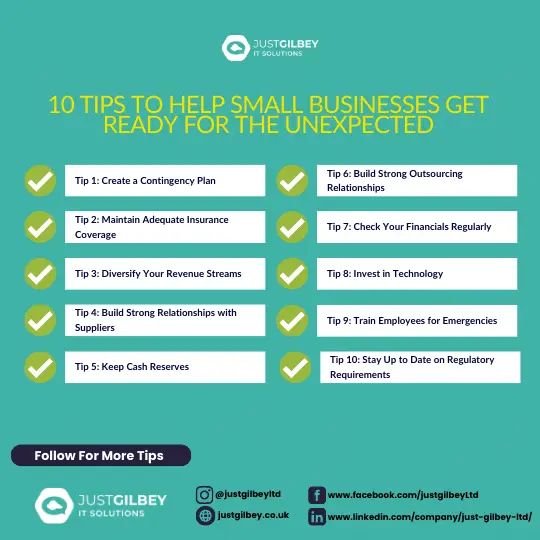
1. Write a contingency plan
A continuity plan doesn’t need to be a thick binder. Two or three pages that people will actually read is better. It should cover:
- who takes charge, and who stands in if they’re away
- emergency contact numbers, written on paper as well as stored in phones
- your most important activities, and how long each could stop before real harm is done
- where people work if the office is unusable
- how you’ll get IT and data back
- how you’ll keep clients, staff and suppliers informed
The government’s Prepare site has simple advice for emergencies such as flooding, fires and power cuts. For example, write down the number to report a power cut (105). It’s also worth checking your premises’ long-term flood risk and signing up for flood warnings.
2. Check your insurance covers what you think it does
Read your policies with three questions in mind:
- Business interruption: does it cover lost income while you can’t trade, and for how long?
- Cyber: does it cover a cyber incident, and what does the insurer expect you to have in place, such as multi-factor authentication or tested backups?
- Property and equipment: is your IT kit covered at replacement value?
In the government survey, 47% of businesses had some form of cyber insurance, but 22% didn’t know whether they did. If you’re not sure, ask your broker.
3. Spread your income
If one client, one product or one referral source brings in most of your income, losing it is your biggest risk. Look for ways to spread it a little: a second service line, a wider spread of clients, or a recurring service alongside one-off work. Even small shifts reduce how exposed you are.
4. Build strong relationships with suppliers
Know who your critical suppliers are, and have a plan B for each one. That might be a second supplier you’ve already vetted, or a few weeks’ stock of the things you can’t work without.
Good relationships help too. A supplier who knows you is more likely to prioritise you when things are tight.
5. Keep a cash buffer
Cash buys time. It pays wages and rent while an insurance claim is processed, or while you replace equipment. Agree with your accountant how many months of fixed costs you want to hold in reserve, and treat it as untouchable for day-to-day spending.
6. Don’t let everything depend on one person
If only one person knows the admin passwords, how the server works or which supplier to call, you have a single point of failure. The same goes for an IT provider who keeps everything in their head.
Write down key systems, logins (in a password manager, not a spreadsheet) and contacts. If you outsource IT, make sure your provider documents your set-up and that you could get at that information if you needed to. A managed IT provider should give you that resilience rather than becoming another single point of failure.
7. Review your finances regularly
Monthly management accounts, cash-flow forecasts and a regular chat with your accountant help you spot trouble early: a client paying late, costs creeping up, a quiet quarter ahead. Problems spotted early are far easier to deal with.
8. Use technology that makes you resilient
The right technology means one bad day doesn’t stop the business:
- files and email in the cloud (such as Microsoft 365), so people can work from anywhere
- laptops rather than desktops, so staff can work from home if the office is closed
- backups that are tested and kept away from the office, including a copy an attacker can’t delete
- multi-factor authentication on email and every important account
Our guide to building a backup strategy walks through the backup side step by step, and our UK backup statistics show where most businesses fall short.
9. Train your team, and rehearse
A plan nobody has read won’t work on the day. Walk your team through it once a year, and make sure everyone knows where it’s kept.
For the cyber side, the NCSC’s Exercise in a Box is free and designed for small organisations. It takes you through realistic scenarios such as ransomware and phishing, and you don’t need to be an expert to run it. An hour round a table with it will show you gaps no document will.
10. Keep up with your legal and regulatory duties
Rules change, and falling behind can cost you money or clients. A few to keep an eye on:
- Data protection. The Data (Use and Access) Act 2025 has been changing UK data protection law in stages. Since 19 June 2026, for example, every organisation must have a process for handling data protection complaints.
- Your sector. Regulated professions have extra expectations. For solicitors, the Law Society’s cyber security guidance is a good starting point. Our pages for solicitors and accountants cover the IT side.
- Your clients’ requirements. More clients and insurers now ask for Cyber Essentials certification. Our free Cyber Essentials checklist shows how close you are.
Where to start
You don’t need to do all ten this month. Start with the plan (tip 1) and the backups (tip 8), because those protect everything else.
If you’d like help with the IT side, our backup and disaster recovery service includes business continuity planning as well as managed, tested backups. The free IT Assessment is a quick way to find out where you stand.
Questions people ask
What should a small business continuity plan include?
Who’s in charge in an emergency, emergency contact numbers on paper, your most important activities and how long you could pause each one, where staff can work if the office is out of action, how you’ll restore IT and data, and how you’ll keep clients informed.
How many UK businesses have a business continuity plan?
33% of UK businesses have a business continuity plan that covers cyber security, according to the government’s Cyber Security Breaches Survey 2025/26. Among small businesses it fell from 53% to 44% in a year.
Is there a free way to test our plan?
Yes. The NCSC’s Exercise in a Box is free and designed for small and medium-sized organisations. It walks you through realistic scenarios such as ransomware and phishing, and you don’t need to be an expert to use it.
Sources
- DSIT: Cyber Security Breaches Survey 2025/2026
- NCSC: Exercise in a Box
- UK Government: Prepare (emergencies such as flooding, fires and power cuts)
- GOV.UK: Check your long term flood risk
- GOV.UK: Sign up for flood warnings
- The Law Society: Cyber security guidance for solicitors
- ICO: New data protection complaints law now in force (June 2026)